© 2026 Skillbru AI Pvt Ltd. All rights reserved.
SkillBrew.AI


AI Interview
Introduction Technical interviews need to reveal more than whether a candidate can arrive at a correct answer. In many engineering roles, the way a developer approaches an unfamiliar problem is just as important as the final code. Can the candidate clarify requirements, break a task into manageable steps, explain trade-offs, respond to feedback and investigate an unexpected result? A conventional coding test can reveal some of these abilities, but it may not show how a person works with anothe

Technical interviews need to reveal more than whether a candidate can arrive at a correct answer. In many engineering roles, the way a developer approaches an unfamiliar problem is just as important as the final code. Can the candidate clarify requirements, break a task into manageable steps, explain trade-offs, respond to feedback and investigate an unexpected result? A conventional coding test can reveal some of these abilities, but it may not show how a person works with another engineer.
Pair programming interviews offer a collaborative way to explore those skills. Instead of asking a candidate to solve a problem alone and reviewing the result later, the interviewer and candidate work through a coding task together. A collaborative code editor gives them a shared space in which they can view the same code, discuss decisions and, when permissions allow, make changes during the session.
Tools such as SkillBrew Code Collab provide a shared coding environment where interviewers and candidates can work on programming tasks, view participant activity and manage editing permissions.
This guide explains what a collaborative code editor is, how pair programming interviews are structured, what employers can observe and how candidates can prepare. It also covers practical considerations such as invitations, editing permissions, code execution, saving work and remote interview setup. The final sections explain how SkillBrew Code Collab supports a shared coding session, using the functionality visible in the supplied product screenshots.
A collaborative code editor is a coding environment that allows multiple people to work with the same code file or workspace. Depending on the product, participants may be able to view changes as they happen, see one another’s cursors, run code, discuss a solution and share access through an invitation or link. Rather than passing files back and forth, collaborators work in one shared environment.
This type of editor can support software development, code reviews, mentoring, learning exercises and technical hiring. In an interview, it gives the candidate and interviewer a common place to examine a problem. The interviewer can follow the candidate’s approach while the candidate explains the reasoning behind each step. If the tool provides permissions, the owner can decide whether another participant may edit or only observe.
A collaborative editor is not automatically the same as a complete integrated development environment or an automated assessment platform. Capabilities differ by product. Some tools focus on synchronized text editing; others also provide language selection, code execution, input and output panels, test cases, file management or participant controls. Recruiters should verify the actual feature set before choosing a tool for a particular interview format.
Pair programming interviews are technical interviews in which a candidate and an interviewer work together on a programming problem. The candidate may take the lead in writing code while the interviewer asks questions, clarifies requirements or introduces a small change. In another format, the interviewer and candidate may alternate between explaining, navigating and editing. The goal is to observe how the candidate thinks and collaborates while solving a realistic task.
The exercise is different from simply asking someone to share a screen and code alone. The interviewer is an active participant in the problem-solving conversation, even if they do not directly edit the file. A shared editor makes the process easier because both people can refer to the same code, follow changes and discuss specific lines without relying on a verbal description of what is on screen.
Pair programming interviews should still be structured and fair. Candidates need a clear problem statement, enough time to understand the task and an explanation of the tools they are expected to use. Interviewers should avoid turning the session into a demonstration of their own preferred coding style. The purpose is to understand the candidate’s reasoning, not to see whether they guess the interviewer’s preferred solution.
The exact format depends on the role, seniority and hiring process, but a well-run session normally follows a sequence. The interviewer introduces the task, checks that the candidate understands the requirements and agrees on a reasonable approach. The candidate then works through the solution while explaining important decisions. The interviewer may ask questions, provide additional constraints or invite the candidate to consider an alternative. Finally, they run examples, inspect edge cases and discuss what could be improved.
A collaborative code editor supports this flow by keeping the code and participants in one place. Before the session, the interviewer should create or prepare the coding file, select a language that is appropriate for the role and confirm that the candidate can access it. At the beginning, both participants should check that they can see the shared workspace and understand who has editing permission. A typical sequence is:
This structure helps keep the conversation purposeful. It also reduces the risk that a candidate spends valuable interview time trying to understand the editor rather than demonstrating technical ability. For remote pair programming interviews, send access instructions in advance and have a backup plan if a participant cannot join.
Traditional coding interviews often ask candidates to solve a problem independently, either on a physical whiteboard, in an online assessment or in a coding environment while the interviewer observes. This can be useful for checking fundamentals and comparing solutions against defined criteria. However, an independent exercise may provide less opportunity to observe how a candidate responds to discussion or works through changing requirements.
Pair programming interviews make the interaction itself part of the exercise. The candidate can explain why they chose a data structure, ask the interviewer to confirm an assumption or revise an approach after considering a new constraint. The interviewer can observe the problem-solving process as it unfolds rather than relying only on the final answer.
Neither format is universally better. A structured assessment may be more appropriate when a company needs to compare many applicants against the same set of questions. A collaborative session may be more useful when the role requires close engineering teamwork or when the hiring team wants to understand how someone approaches an unfamiliar problem. Many recruitment processes use more than one format at different stages.
For organizations that also need to evaluate programming knowledge through structured tests, AI Assessments can support technical evaluation through coding questions and objective assessments. These assessments complement collaborative interviews by evaluating skills through a different format.
| Area | Traditional coding interview | Pair programming interview |
| Working style | Candidate often solves independently | Candidate and interviewer work together |
| Interaction | May be limited to instructions and follow-up questions | Ongoing discussion is central |
| Observation | Focus may centre on submitted solution | Reasoning and collaboration are visible |
| Feedback | Often after the exercise | Can happen during the exercise |
| Tools | Assessment platform or editor | Shared coding environment is useful |
| Evaluation | Correctness and technical knowledge | Correctness, reasoning, communication and collaboration |
The interviewer should evaluate a balanced set of behaviours rather than treating typing speed or the number of completed lines as a proxy for engineering ability. A candidate who pauses to clarify an ambiguous requirement may be demonstrating good judgement. Someone who spots an error, explains its cause and corrects it may reveal more useful problem-solving ability than a candidate who writes quickly but cannot explain the result.
Observe how the candidate turns a broad problem into smaller steps. Do they identify inputs and expected outputs? Can they recognize constraints, choose a suitable approach and explain why it should work? Strong candidates often discuss more than one possible solution before selecting one. Consider the quality of the reasoning, not just whether the first idea is correct.
Look for appropriate use of language features, data structures, functions and control flow. The code does not need to be production-ready in a short interview, but it should be understandable and reasonably organized. Ask the candidate to explain naming choices, structure and assumptions. Avoid over-weighting formatting preferences that do not affect clarity or correctness.
A collaborative exercise gives candidates an opportunity to explain their thinking. Notice whether they communicate important decisions, ask useful questions and make assumptions clear. Communication does not mean narrating every keystroke. It means sharing enough context for another engineer to understand the direction of the solution and contribute meaningfully.
A useful interview task includes room to inspect behavior and correct mistakes. Observe how the candidate responds when code fails or an output differs from expectations. Do they read the error, isolate the issue and test a hypothesis? Debugging is a normal part of software development, so an error should not automatically be treated as a failure.
Notice how the candidate responds to a suggestion, a question or a changed requirement. Can they consider another perspective without losing track of the task? Do they explain disagreement constructively? Pair programming interviews can reveal these behaviors, but one short session should not be treated as a complete measure of a person’s teamwork or personality.
Candidates should be encouraged to test more than the happy path. Depending on the problem, useful examples may include empty input, repeated values, large values, invalid data or boundary conditions. Ask what the tests demonstrate and what they do not cover. A thoughtful testing discussion can reveal whether the candidate understands the assumptions behind their implementation.
Participants should be able to work from a common version of the code. Clear cursor indicators can help each person understand where the other is working. If the tool supports view-only access, the interviewer can observe without allowing edits until the candidate is ready.
The editor should support programming languages relevant to the roles being recruited. Confirm the available language list before scheduling an interview, and let candidates know which languages they can choose. Do not assume every browser-based editor supports every language or framework.
A Run Code function, console, input and output panels can help participants check whether a solution behaves as expected. A test-case area can make it easier to explore sample inputs and edge cases. Check whether the environment supports the particular execution requirements of the exercise.
A useful editor should make it clear who owns the file, who has joined and what each participant is allowed to do. Owners may need to invite participants, control edit access and retain administrative actions. Contributors may need only the ability to view, edit when permitted and download a copy.
Downloading a file and saving a workspace are different actions. Downloading creates a local copy that a participant can keep. Saving within the platform preserves workspace progress there, where that functionality is available. Interviewers should understand who can perform each action and how to protect work from accidental loss.
Preparation should cover coding skills and the collaborative nature of the session. Candidates do not need to memorize a script, but they should practice explaining their approach in a clear and natural way. The aim is to make their reasoning visible while still focusing on solving the problem.
If the interviewer uses a collaborative editor, candidates should pay attention to the permission model. They may initially join in view-only mode and receive edit access later. This is not necessarily a technical issue; it may be an intentional way for the interviewer to control the session. Ask politely if the code appears locked or if the next step is unclear.
SkillBrew Code Collab provides a shared coding workspace that can be used for collaborative coding and technical interview sessions. Based on the product interface shown in the supplied screenshots, users can create a file, choose a supported programming language, invite another participant, manage edit access, run code and work with console and test-case panels. The owner retains control over saving the file and managing the workspace, while contributors have a more limited set of actions.
The workflow begins in the file area. The owner selects Create New File, enters a file name and chooses a language. The interface offers Python, Java, C++, JavaScript, C and Go. After creating the file, the owner can open the sharing dialog, enter a participant’s email address and send an invitation. A Copy Link option is also visible in the sharing interface.
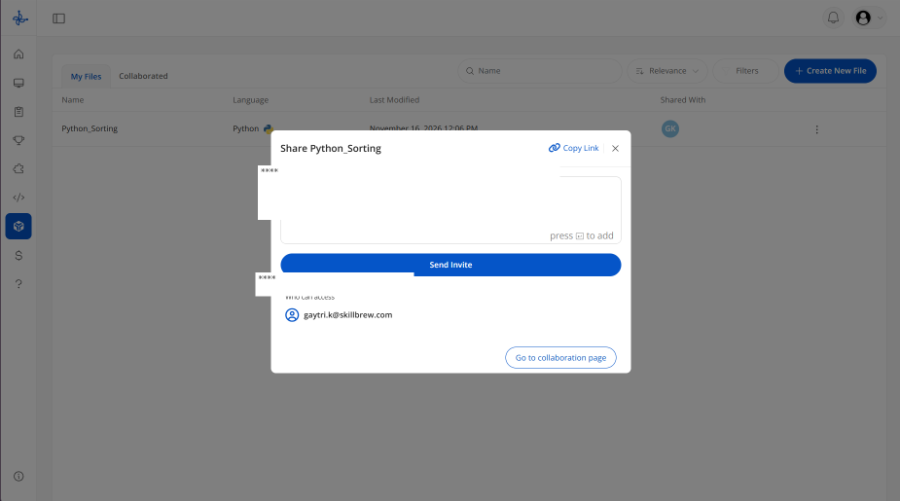
Sending an invitation does not mean that the invited person has already joined the coding session. The participant appears in the contributor or shared-with area after accepting the invitation or entering the Code IDE. This distinction matters when an interviewer checks whether the candidate is actually present. The participant list can also show whether a participant is online or offline.
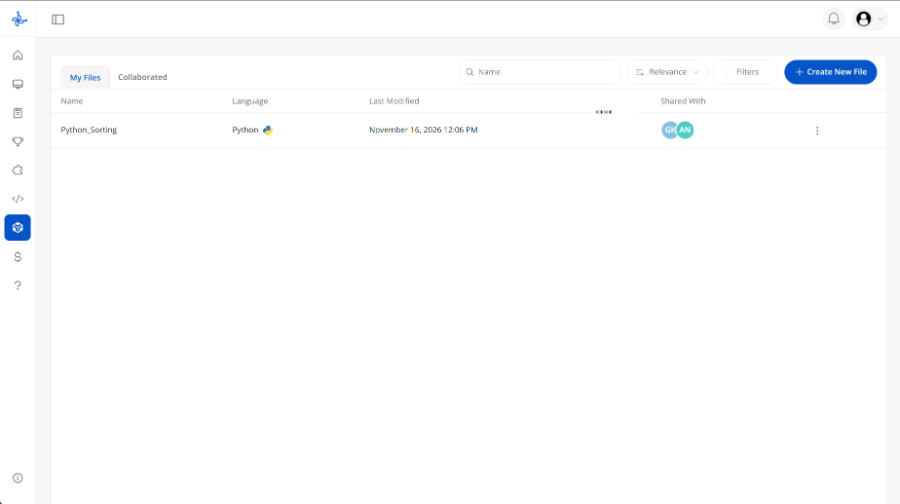
The owner can manage whether a contributor is allowed to edit. Until edit permission is enabled, the contributor’s cursor may be visible in the editor, but the contributor cannot modify the code. When the interface displays “| Edit” next to a participant’s status, it indicates that the person has editing permission. This lets an interviewer decide when a candidate should begin writing or changing code, rather than granting edit access automatically when an invitation is sent.
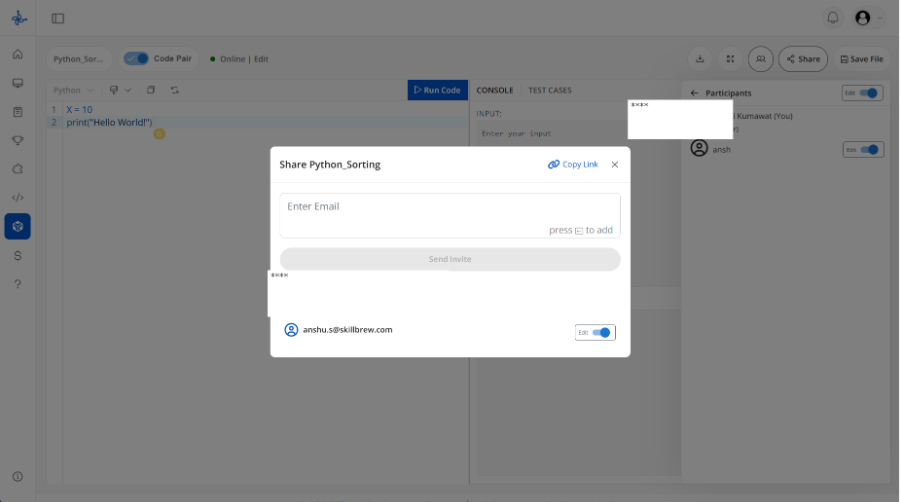
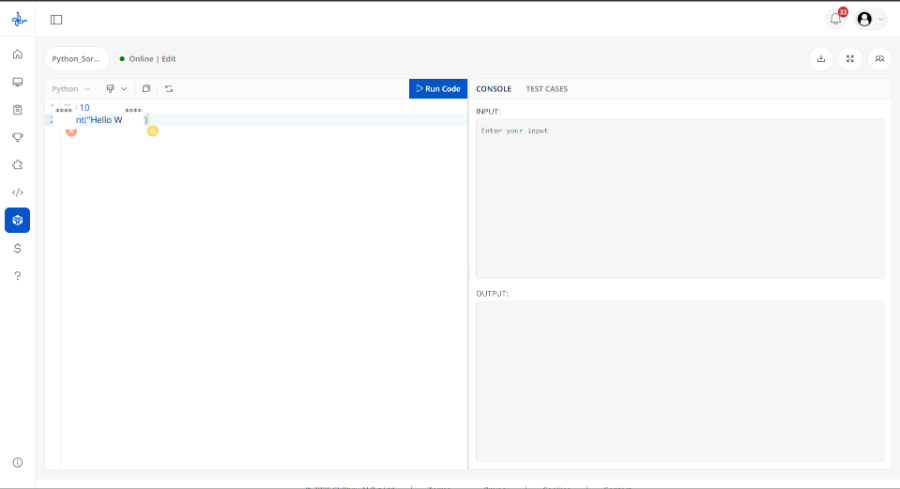
The editor interface includes a language selector, a code area, a Run Code control and panels labelled Console and Test Cases. The console area displays input and output sections. These tools can support a discussion about how a solution behaves and whether it handles the examples being considered. The screenshots also show Code Pair mode and participant cursors in the shared editor. These visible indicators can help both people follow the session.
The owner and contributor can both download the code file. Saving progress within the Code Collab workspace is different: only the owner can save the file. This distinction is useful if the browser or webpage is closed unexpectedly, because the owner can preserve the progress made in the workspace by saving it. Contributors cannot independently save the workspace, invite additional participants, share the file or manage access permissions. Those controls remain with the owner.
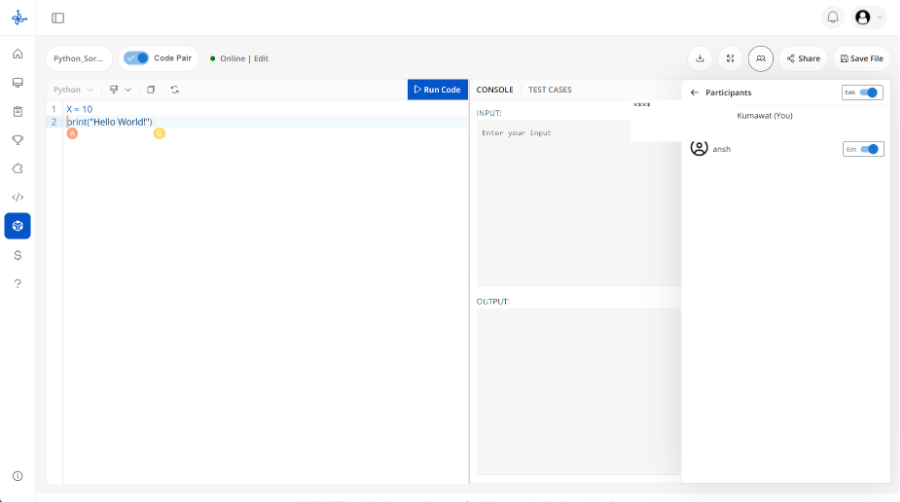
Figure 6. Participant area in the editor, with owner-controlled editing access. Personal names have been masked.
For a hiring team, this owner-and-contributor model can be useful during a structured interview. The interviewer can create the file and retain control over the session, while the candidate joins as a contributor. The interviewer can first explain the task, allow the candidate to inspect the code and then enable editing when appropriate. Both people can follow the shared workspace, while the owner remains responsible for saving the file and managing access.
SkillBrew Code Collab should be described according to these confirmed functions. The screenshots demonstrate collaborative editing controls, code execution areas, participant status and owner-managed permissions. They do not establish automatic candidate scoring, AI evaluation, interview recording or generated assessment reports. Those capabilities should not be attributed to Code Collab unless separately verified.
| Action | Owner | Contributor |
| Create a coding file | Yes | No |
| Invite participants / share file | Yes | No |
| View shared code | Yes | Yes |
| Edit code | Yes | Only when owner enables Edit |
| See participant cursors | Yes | Yes |
| Download code file | Yes | Yes |
| Save progress in workspace | Yes | No |
| Manage access permissions | Yes | No |
| View online/offline status | Yes | Yes |
It is a technical interview in which a candidate and an interviewer work together on a programming problem. The interviewer can observe the candidate’s reasoning, coding approach, communication and response to feedback.
It provides a shared coding space where participants can view the same code and, when permitted, edit it together. Some editors also include code execution, console output and test-case features.
Yes. A browser-based shared editor can support remote sessions, provided both participants can access the workspace and have a reliable connection. Interviewers should share instructions and check access before the session.
No. The participant must first accept the invitation or enter the Code IDE to appear as a contributor. The owner must also enable Edit permission before the contributor can modify the code.
Both the owner and contributor can download the code file. Only the owner can save the file within the workspace to preserve progress.
It indicates that the participant has permission to edit the code. Without that permission, the contributor may still see their cursor in the shared editor but cannot modify the code.
A collaborative code editor gives interviewers and candidates a shared place to discuss and work through programming problems. When used thoughtfully, pair programming interviews can provide useful evidence about how a developer approaches a task, explains decisions, responds to feedback and tests a solution. They work best when the problem is relevant, the session is structured and candidates understand the tools and expectations before the exercise begins.
For employers, the important step is to evaluate the process as well as the result. A correct solution matters, but so do clear reasoning, sensible testing and constructive collaboration. For candidates, preparation means practicing coding fundamentals while becoming comfortable explaining an approach and adapting when new information appears.
SkillBrew Code Collab supports this kind of shared session through file creation, language selection, invitations, participant visibility, owner-managed edit permissions, code execution, test-case and console panels, downloading and owner-only saving. Used with a clear interview plan and fair evaluation criteria, it can provide a practical workspace for pair programming interviews.
Discover how SkillBrew helps hiring teams cut time-to-hire by 60% with skill-validated assessments and AI-ranked shortlists.
Book a free demoNo commitment required · 30 minutes