AI Interview
Interview Guide for Candidates: How to Prepare and Perform Well
A job interview is an opportunity to show how your experience, skills, and approach match a role. Preparing well can help you feel more confident, communicate clearly, and avoid last-minute technical problems. This interview guide walks you through the process, from understanding the invitation to completing an online interview. This interview guide is designed to help candidates prepare for both traditional and AI-powered interviews. An online interview may include an AI interviewer, camera a

A job interview is an opportunity to show how your experience, skills, and approach match a role. Preparing well can help you feel more confident, communicate clearly, and avoid last-minute technical problems. This interview guide walks you through the process, from understanding the invitation to completing an online interview.
This interview guide is designed to help candidates prepare for both traditional and AI-powered interviews.
An online interview may include an AI interviewer, camera and microphone checks, screen sharing, and monitoring rules. The exact process can vary by organization and role, so always follow the instructions in your invitation. Use this interview guide as a practical preparation resource, not as a replacement for the organizer’s instructions.
1. Understand your interview invitation
Start by reading the invitation carefully. It usually explains the role, organization, interview window, join time, duration, rules, and the link you need to access the interview. Save the message so you can return to it on the day.
Check these details before you plan your schedule:
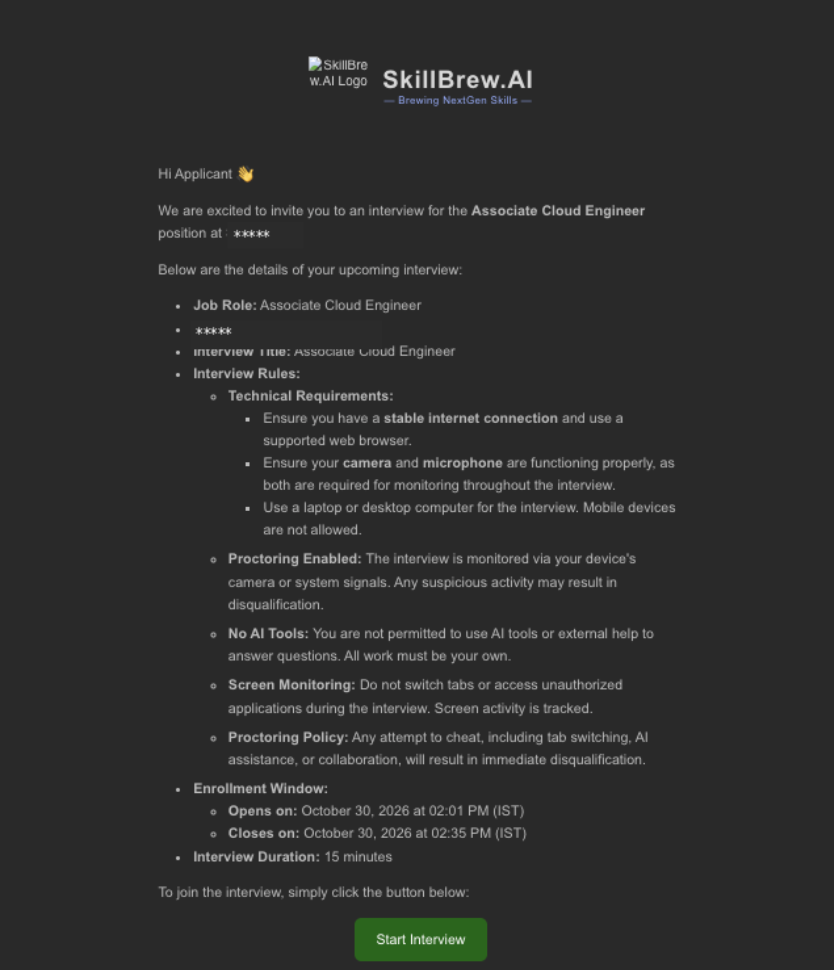
A useful interview guide should start with understanding the invitation and knowing what to expect.
2. Three ways to access your interview
Depending on how the organization has configured its hiring process, you may be able to open the interview from an email invitation, the platform’s Notifications area, or the Interview list. The destination page is designed to let you review the details before you begin.
This interview guide explains the different ways candidates can find and access their scheduled interviews.
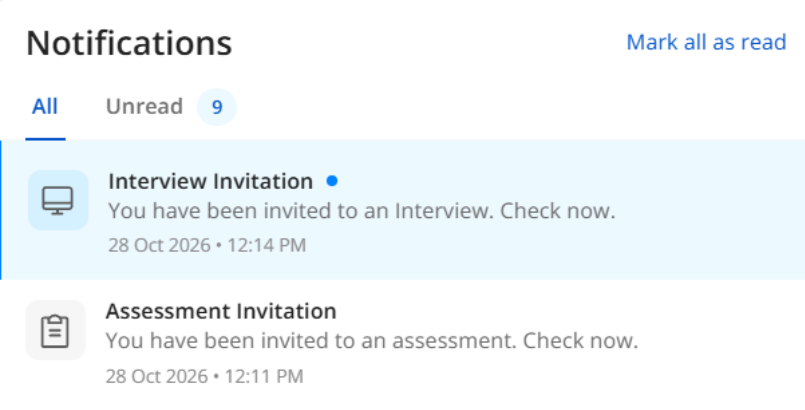
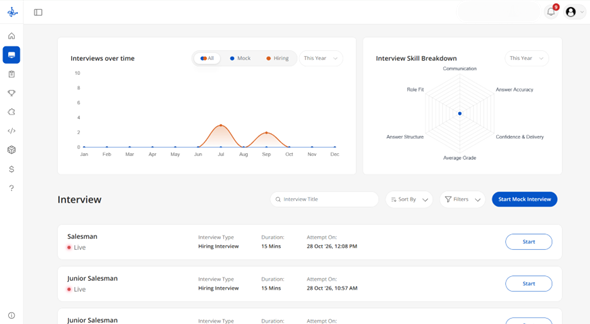
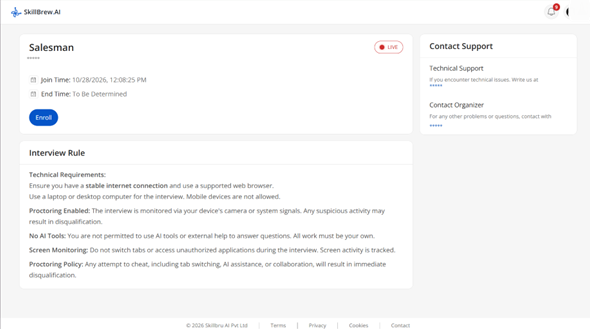
Keep this interview guide handy when checking your interview details before the scheduled time.
3. Check the join time and countdown
An interview may appear with an Upcoming status before it becomes available. A countdown beside the status shows how much time remains before the scheduled start. The Join Time field provides the scheduled date and time.
Do not confuse the scheduled join time with the interview duration. If an invitation gives a 15-minute duration, treat that as the duration for that specific example only; other interviews may be longer or shorter. This interview guide recommends opening the invitation early enough to review the rules and complete setup checks.
Following this interview guide can help you avoid confusion about interview timings and access windows.
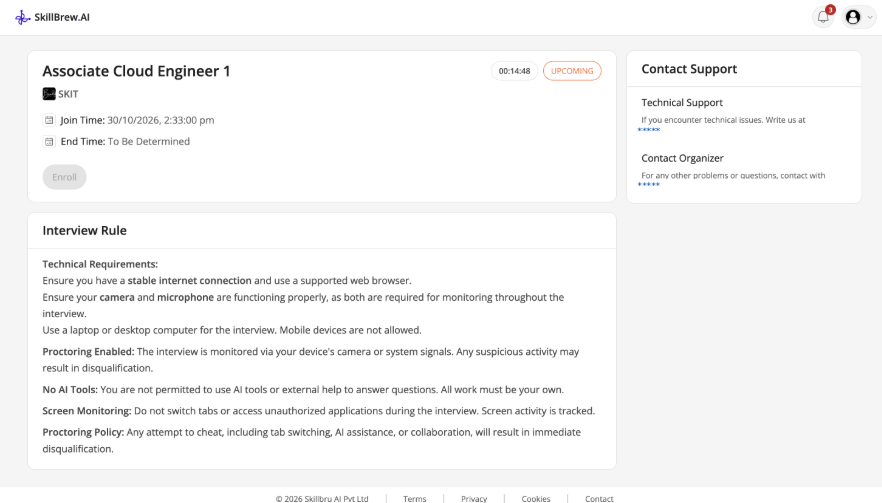
4. Review the interview rules before starting
Read every rule on the interview details page. The rules shown in the supplied SkillBrew experience include the following requirements:
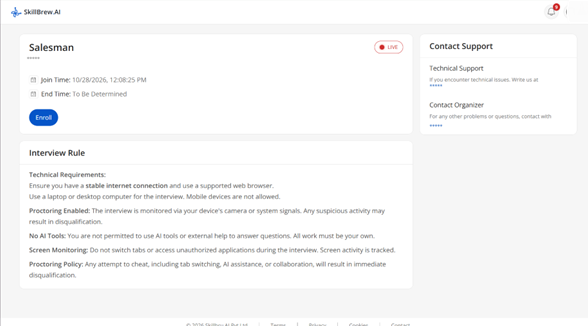
Every interview guide should emphasize the importance of understanding the rules before starting.
5. Prepare your answers and examples
Preparation is more than memorizing answers. Review the job description and identify the skills the employer is likely to assess. Choose examples from work, education, internships, projects, volunteering, or other relevant experience.
This interview guide recommends preparing examples that demonstrate your skills, experience, and problem-solving ability.
Use the STAR method to structure experience-based answers:
- Situation: Briefly explain the context.
- Task: Describe the responsibility or goal.
- Action: Explain the specific steps you took.
- Result: Share the outcome, using numbers or evidence where possible.
A practical interview guide should help you organize your answers without making them sound memorized.
6. Complete the technical setup checks
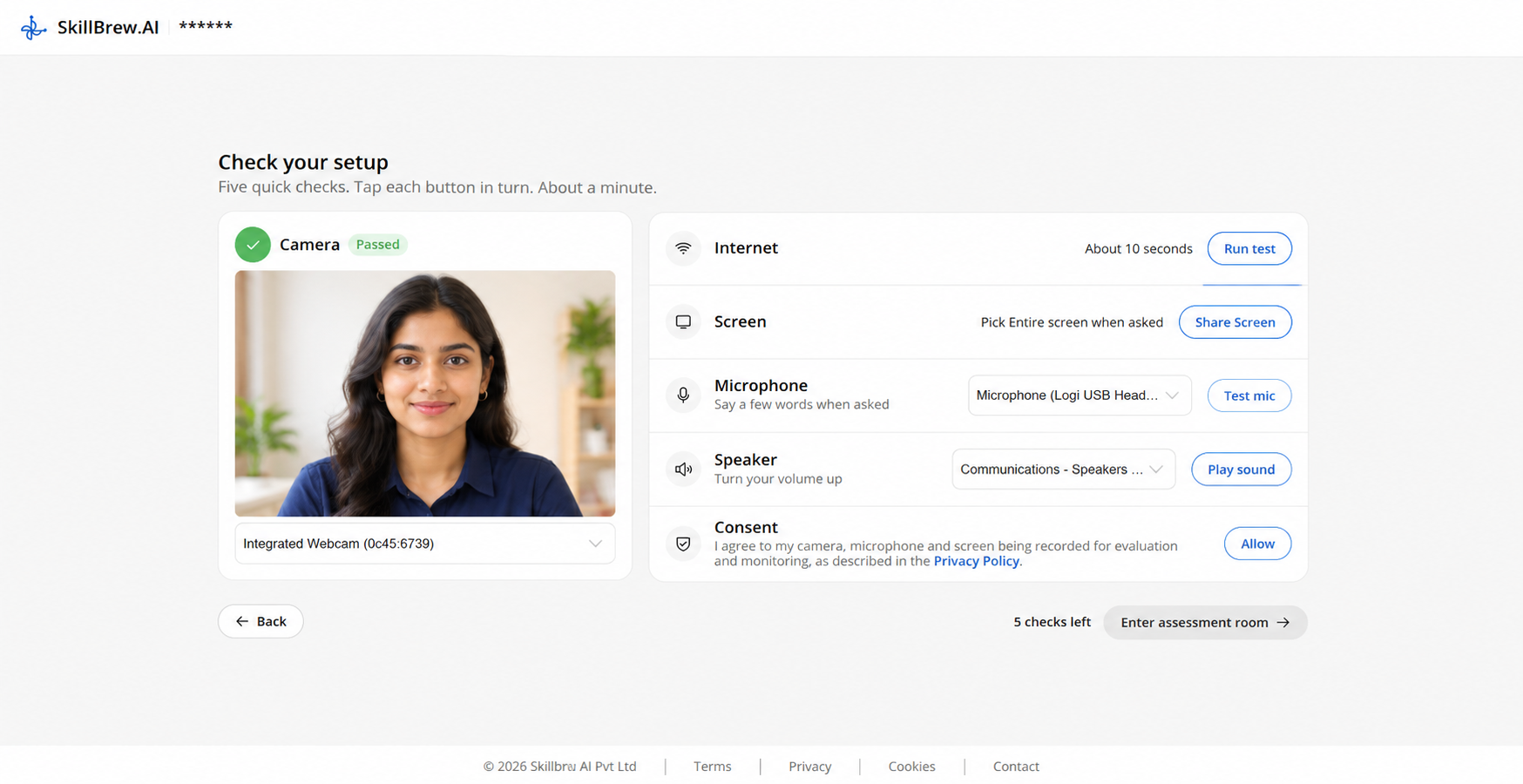
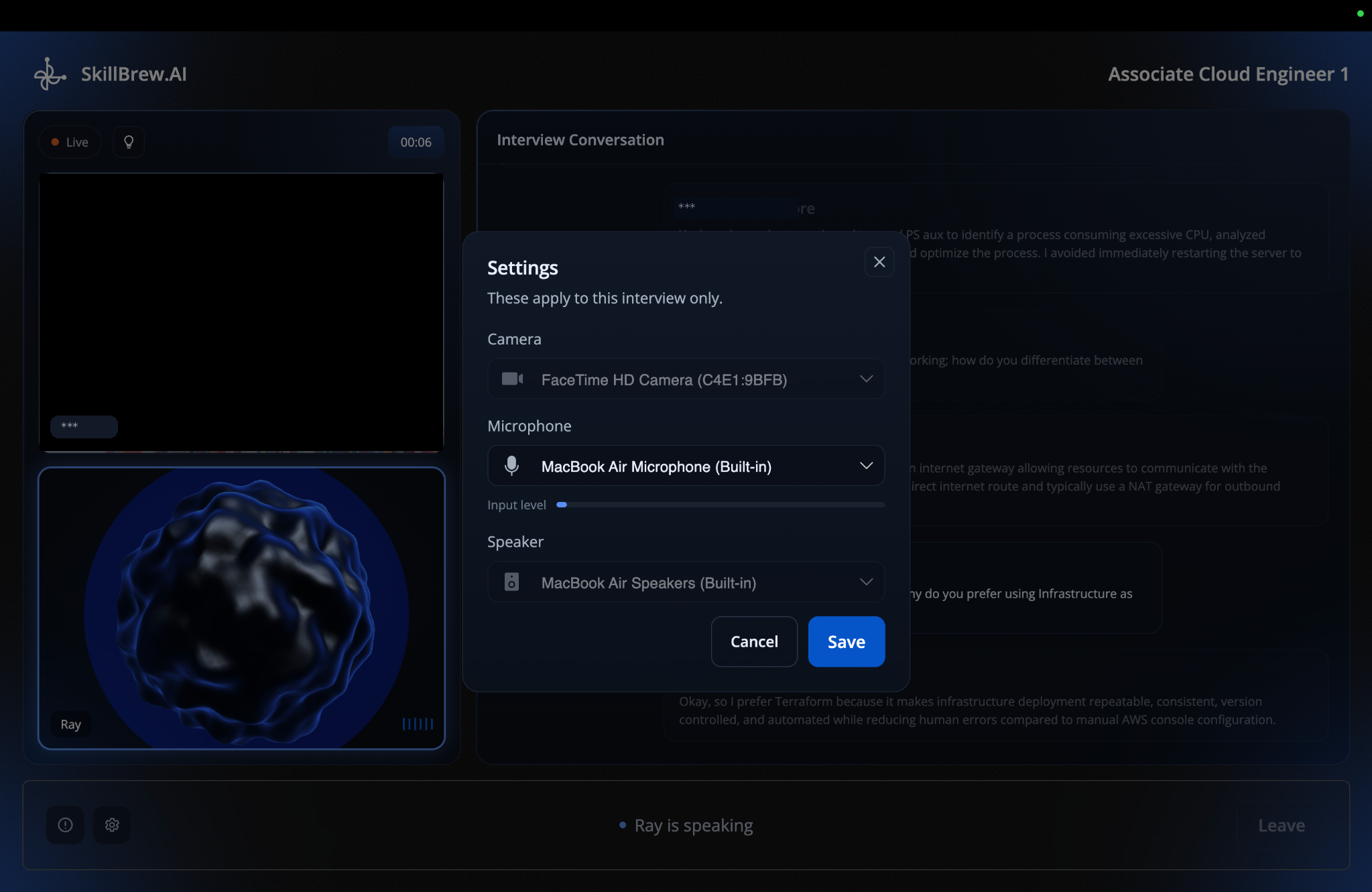
Before entering the interview room, the platform may ask you to complete a series of setup checks. In the recorded walkthrough, the page presents five checks: camera, internet, screen sharing, microphone, speaker, and consent. Complete each item and resolve any issue before continuing.
- Camera: Confirm that the correct camera is selected and that your face is visible. Adjust lighting and camera position if the preview is too dark or poorly framed.
- Internet: Run the connection test and wait for a stable result. If the connection is unstable, move closer to your router, pause large downloads, or use a more reliable network.
- Screen: When prompted, choose the entire screen if that is what the interview requires. Check that screen sharing is active before entering the room.
- Microphone: Select the correct input device and use the test option. Speak at a normal volume and check that your voice is detected clearly.
- Speaker: Play the sample sound and confirm that you can hear it. Increase the volume or select the correct output device if needed.
- Consent: Read the notice about camera, microphone, and screen recording for evaluation and monitoring. Continue only after you understand and agree to the stated terms.
7. What happens inside the interview room?
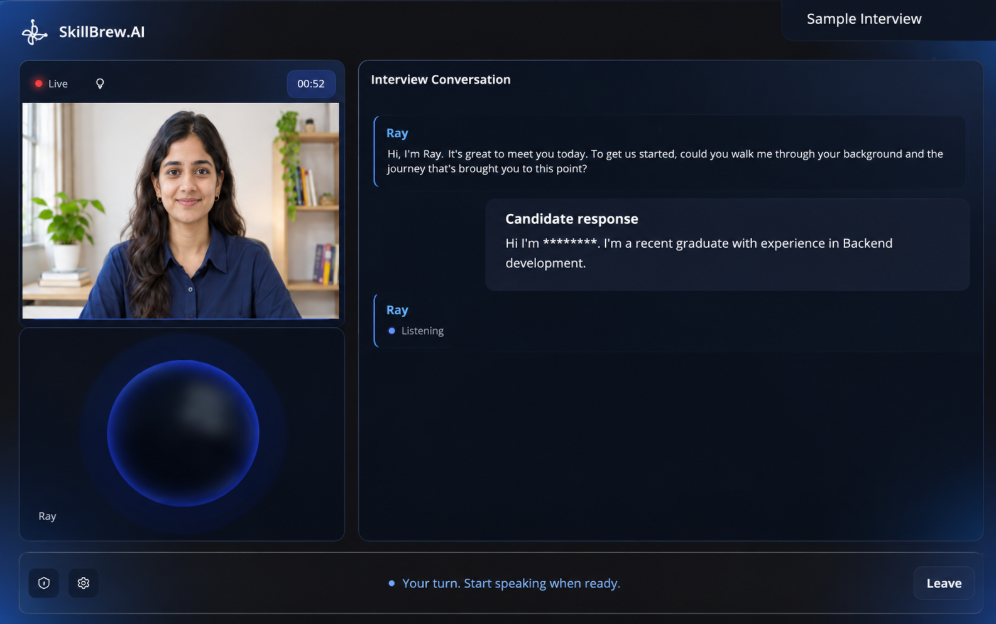
After the setup checks are complete, select Enter interview room. The interview interface may show your camera preview, the AI interviewer, a conversation panel, a live status or timer, and controls along the bottom of the screen.
Listen to the full question before answering. Speak clearly and naturally, and give enough detail to explain your thinking. If the interviewer asks a follow-up question, respond to that question rather than repeating a prepared answer. This interview guide encourages candidates to treat the interaction like a professional conversation.
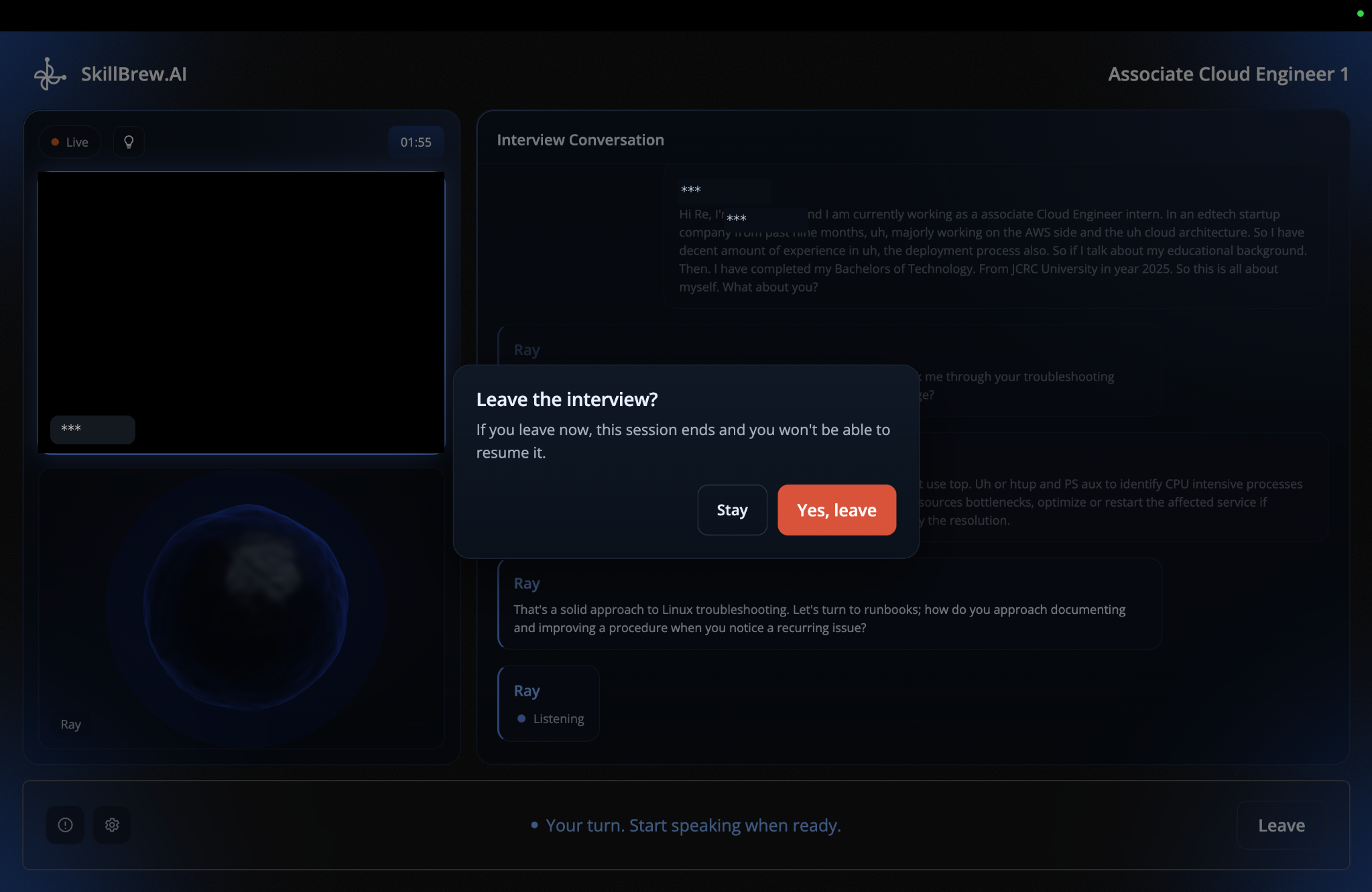
8. Understand the Report Issue and Leave controls
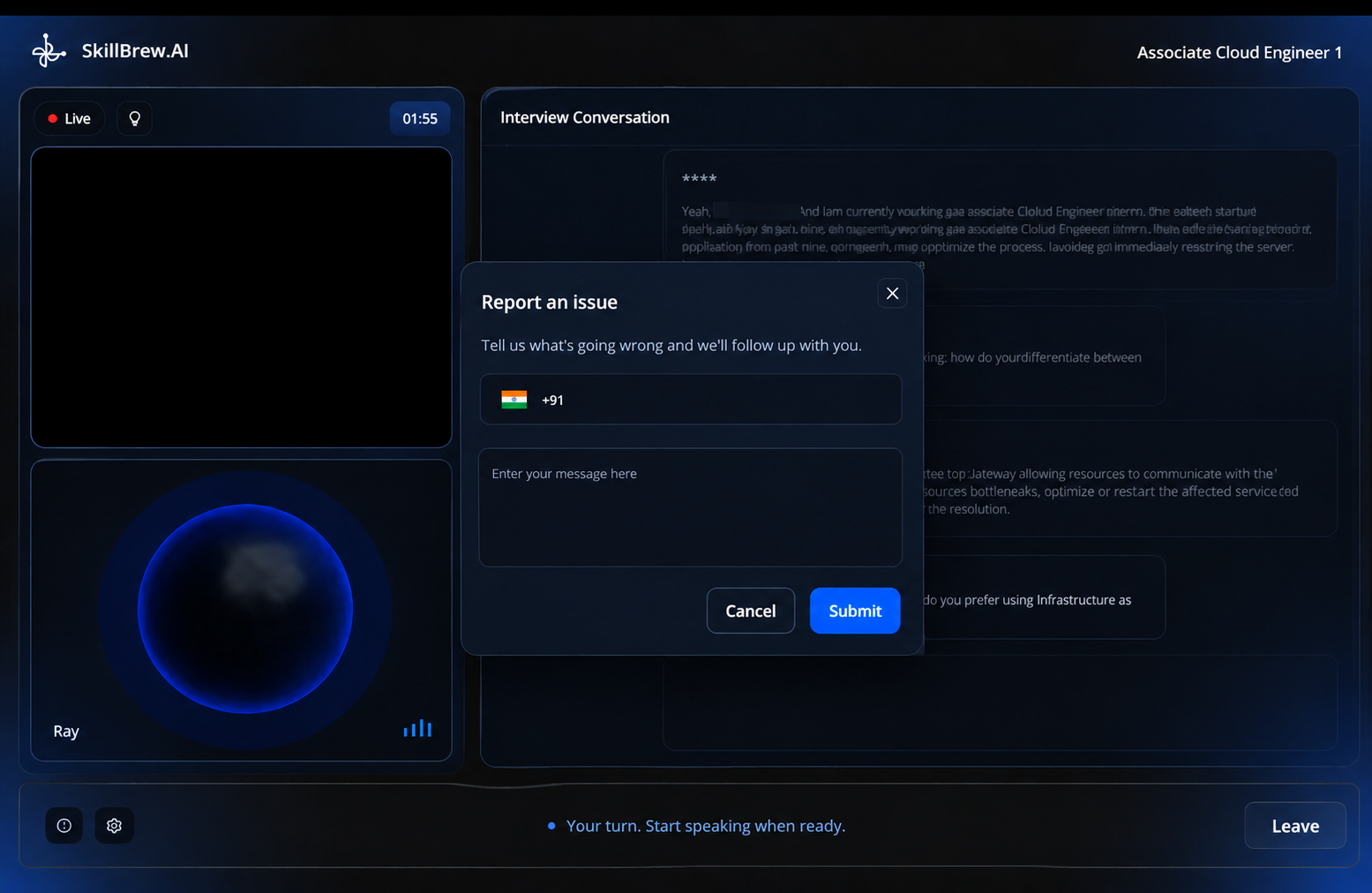
The interview screen includes controls that serve different purposes. The Report Issue control is represented by an alert or information icon near the lower-left area of the interview window. Use it when something is preventing you from completing the interview properly, such as a technical malfunction, an audio or video problem, or an unexpected issue with the interview experience. Provide a clear description of what happened. Reporting an issue is not a substitute for answering a question, and it does not automatically extend the interview window.
The Leave button appears at the lower-right side of the interview screen. Select it only when you intend to exit the interview. Leaving may end your active session, so do not click it accidentally or use it simply to refresh the page. If you are unsure whether the interview is complete, ask the AI interviewer to conclude where that option is supported, or follow the on-screen completion instructions before leaving.
If you experience a problem that makes continuing impossible, use Report Issue if available and contact the organizer or support team. Avoid repeatedly refreshing or opening multiple interview tabs unless the organizer tells you to do so.
9. How to perform well during the interview
Keep your answers focused and relevant. Start with the main point, explain the context, describe the action you took, and finish with the result or lesson. For technical questions, explain your approach and assumptions before giving the final answer.
Be honest about what you know. If you have not used a tool or technology, say so and explain how you would learn it. Do not claim responsibility for work completed by someone else. Clear, genuine answers are more useful than rehearsed claims.
Maintain a professional setting: sit comfortably, look toward the camera when appropriate, avoid unnecessary movement, and keep your phone away. Speak at a steady pace and pause briefly to organize your thoughts.
10. How does an interview end?
An interview may end when you select the Leave or end control, when you ask the AI interviewer to finish if that option is supported, or when the session ends automatically after completion. Follow the final on-screen message and wait for the platform to confirm the status before closing the browser.
Do not assume that closing the browser is the same as completing the interview. If the session disconnects unexpectedly, contact the organizer and explain what happened.
11. What if the interview link has expired?
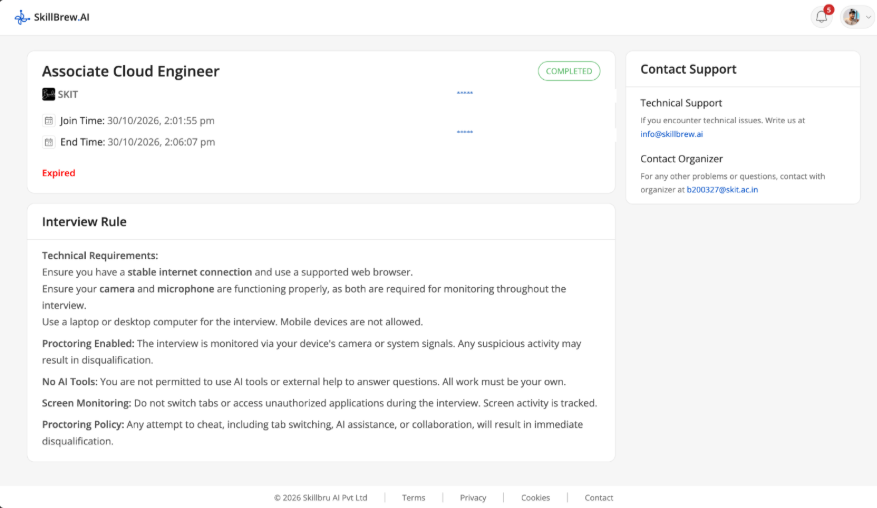
If the page displays Expired, the enrolment or access window has ended. Check the date and time in your invitation first. If you believe you should still have access, contact the organizer and request confirmation of the correct window or a new invitation. SkillBrew technical support can help with platform issues, but the hiring organization controls interview scheduling and access.
12. What if you try to reopen an interview you already completed?
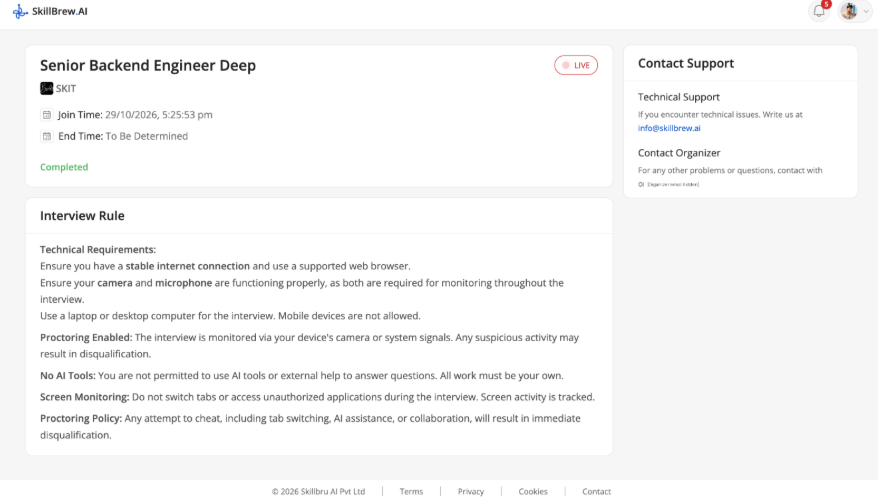
If you return to an interview after finishing it, the details page may still be visible and show a Completed status. This indicates that the interview has already been completed; it does not mean that another attempt is available.
Review the role and join-time details to make sure you have opened the correct interview. If you think the status is incorrect, or the organizer has asked you to take the interview again, contact the organizer and request confirmation or a fresh attempt. For platform-related technical issues, use the support contact shown on the page.
13. Common mistakes to avoid
Leaving preparation until the last minute, overlooking the join time, using a phone when a laptop or desktop is required, skipping the camera or microphone test, and ignoring the monitoring rules can all create avoidable problems.
During the interview, avoid switching tabs, opening unauthorized applications, using AI tools or outside help, interrupting the interviewer, or clicking Leave by mistake. The interview rules are part of the assessment, so follow them even if a particular instruction seems familiar.
14. Candidate checklist
Use this quick checklist on the day of your interview:
- I have checked the role, organization, join time, and access window.
- I have read the interview rules and know whether a laptop or desktop is required.
- My internet connection is stable, and my camera, microphone, and speakers work.
- I have completed screen-sharing and consent checks where required.
- I am in a quiet, well-lit space and have relevant examples ready.
- I will answer independently and avoid unauthorized tools or tab switching.
- I understand how to report an issue and how to leave the session correctly.
Conclusion
A successful interview starts before the first question. Understand the invitation, prepare relevant examples, test your equipment, follow the rules, and communicate your experience clearly. Keep this interview guide handy when preparing for an online interview, and always prioritize the specific instructions shared by the hiring organization.
Want to practise before the real conversation? Try SkillBrew’s AI interview practice to become more comfortable answering interview questions.
Frequently asked questions
- How early should I join an online interview?
Open the invitation ahead of time so you can review the details and complete setup checks. Follow the join time and access window provided by the organizer. - What should I do if my camera or microphone does not work?
Check device permissions, select the correct camera or microphone, and rerun the relevant setup test. If the issue continues, use Report Issue and contact support or the organizer. - Can I use AI tools to help answer questions?
The supplied interview rules prohibit AI tools and external help. Complete the interview independently and follow the rules in your invitation. - What should I do if I accidentally leave the interview?
Contact the organizer immediately, explain what happened, and ask whether the session can be reopened. Do not assume that you can rejoin automatically. - Where can I find my interview if I cannot locate the invitation email?
Depending on the organization's setup, you may also be able to access your interview through the platform's Notifications section or Interview list. Check these areas and verify the role and scheduled join time.
See AI-powered hiring in action
Discover how SkillBrew helps hiring teams cut time-to-hire by 60% with skill-validated assessments and AI-ranked shortlists.
Book a free demoNo commitment required · 30 minutes
Continue reading
View All Posts