Recruitment Automation & Workflow
Recruitment and Hiring Process Flowcharts: A Step-by-Step Guide
Hiring involves several connected activities, from identifying a vacancy to onboarding a new employee. When these activities are handled without a clearly defined workflow, recruitment teams can experience delays, inconsistent evaluations, missed follow-ups, and confusion about who is responsible for the next step. A recruitment and hiring process flowchart helps solve these problems by turning the hiring journey into a visual sequence of steps, decisions, and outcomes. It shows recruiters, hir

Hiring involves several connected activities, from identifying a vacancy to onboarding a new employee. When these activities are handled without a clearly defined workflow, recruitment teams can experience delays, inconsistent evaluations, missed follow-ups, and confusion about who is responsible for the next step.
A recruitment and hiring process flowchart helps solve these problems by turning the hiring journey into a visual sequence of steps, decisions, and outcomes. It shows recruiters, hiring managers, and other stakeholders how candidates move through the process and what happens when a particular requirement is not met.
Whether you are hiring for a single position or managing hundreds of candidates across multiple roles, a well-designed flowchart can make your recruitment process easier to understand, monitor, and improve.
In this guide, you will learn what a hiring flowchart is, why it matters, how to create one, which stages to include, and how recruitment technology can help teams manage repetitive activities more efficiently.
What Is a Recruitment and Hiring Process Flowchart?
A recruitment and hiring process flowchart is a visual representation of the steps an organization follows to identify, evaluate, select, and onboard candidates.
It uses shapes, arrows, and decision points to show the order of activities and the possible outcomes at each stage. For example, a flowchart may show that an application moves to screening when a candidate meets the initial requirements, while an application that does not meet those requirements is closed or reviewed according to the organization's policy.
Unlike a written recruitment policy, which explains rules and responsibilities in detail, a flowchart gives readers a quick overview of how the process works.
A typical flowchart may include:
- Process steps: Activities such as publishing a job, screening applications, conducting interviews, and issuing offers.
- Decision points: Questions such as whether a candidate meets the minimum criteria or accepts an offer.
- Arrows: Connections showing the direction of the workflow.
- Start and end points: The beginning of a hiring request and the completion of hiring.
- Alternative routes: Actions taken when a candidate is rejected, an offer is declined, or a vacancy requires additional sourcing.
The exact workflow depends on the organization's size, hiring volume, job requirements, and approval policies. A small business hiring one employee may use a simple sequence, while a large organization may need separate workflows for campus recruitment, technical hiring, high-volume frontline roles, and leadership positions.
Why Is a Recruitment and Hiring Process Flowchart Important?
A documented hiring workflow helps recruitment teams establish a consistent approach to candidate evaluation and hiring decisions.
1. Clarifies responsibilities
Recruitment involves several stakeholders, including recruiters, hiring managers, interviewers, HR teams, and finance or leadership teams responsible for approving vacancies.
Without clear ownership, tasks can be delayed because no one knows who must take the next action.
A flowchart can identify the owner of each step. For example, HR may approve the hiring request, the recruiter may source and screen candidates, and the hiring manager may conduct the final interview.
2. Reduces unnecessary delays
A candidate may wait several days between screening and an interview because interviewers have not submitted feedback or the recruiter is waiting for an approval.
Mapping the workflow makes these handoffs visible. Teams can identify where work accumulates and introduce clearer deadlines, reminders, or escalation procedures.
3. Supports consistent candidate evaluation
When different recruiters follow different processes, candidates applying for similar positions may receive different screening questions, assessments, or evaluation criteria.
A standardized flowchart can define the stages and decision rules that should apply to a particular role. Recruiters can still make appropriate adjustments, but those changes are based on an agreed process rather than individual preference.
4. Improves candidate communication
Candidates need timely updates about their applications, interviews, assessment results, and offers.
A flowchart can include communication checkpoints, such as acknowledging an application, confirming an interview, notifying unsuccessful candidates, and following up on pending offers.
These checkpoints help recruiters reduce the likelihood of candidates being left without an update.
5. Makes recruitment performance easier to measure
A documented process helps organizations measure performance at individual stages instead of looking only at the final number of hires.
Useful metrics include:
- Time from vacancy approval to job publication
- Application-to-screening conversion rate
- Screening-to-interview conversion rate
- Assessment completion rate
- Interview-to-offer conversion rate
- Offer acceptance rate
- Time to hire
- Candidate withdrawal rate
These metrics help teams identify bottlenecks and understand which parts of the hiring process need improvement.
Recruitment and Hiring Process: Step-by-Step Guide
The following stages provide a general framework for building a hiring flowchart. Organizations can combine, remove, or expand steps depending on the position and applicable hiring requirements.
Step 1: Identify the hiring need
The process begins when an organization identifies a vacancy or a need for additional employees.
The need may arise because of business growth, employee turnover, a new project, seasonal demand, or the creation of a new position.
The hiring manager should define why the role is needed, what responsibilities it will cover, and how success will be measured.
Flowchart step: Hiring need identified.
Responsible stakeholders: Hiring manager and relevant business leaders.
Key output: An initial hiring request with the role requirements and business justification.
Step 2: Approve the vacancy and budget
Before recruitment begins, the organization may need to confirm headcount availability, compensation limits, and budget approval.
If the request is approved, the process continues to role definition. If it is rejected or requires changes, the request returns to the relevant stakeholder for revision.
This decision point prevents recruiters from spending time sourcing candidates for positions that have not been authorized.
Flowchart decision: Is the vacancy approved?
- Yes: Proceed to role definition.
- No: Revise the request or pause hiring.
Step 3: Define the role and selection criteria
Once the vacancy is approved, the hiring manager and recruiter should agree on the job description, essential qualifications, responsibilities, experience requirements, and evaluation criteria.
They should distinguish between mandatory requirements and preferred qualifications. This helps recruiters screen applications consistently without excluding potentially suitable candidates for irrelevant reasons.
The team should also determine the assessment and interview stages required for the role.
For example, a software engineering position may require a coding assessment and technical interview. A customer-facing position may place greater emphasis on communication, problem-solving, and situational judgment.
Flowchart step: Define the role and selection criteria.
Key output: An approved job description and a structured evaluation plan.
Step 4: Source candidates
Candidate sourcing attracts applicants through suitable channels. These may include job boards, company career pages, professional networks, employee referrals, recruitment agencies, campus placement programs, and existing talent databases.
The sourcing approach should match the target candidate group. Campus recruitment may require coordination with educational institutions, while experienced technical hiring may rely on professional networks and specialized job platforms.
For high-volume roles, recruiters may also need to manage large candidate lists and organize outreach across multiple hiring locations.
Flowchart step: Source candidates.
Key output: A candidate pool ready for application review or initial screening.
Step 5: Screen applications
Recruiters review applications to determine whether candidates meet the role's initial requirements.
Depending on the position, screening may involve reviewing resumes, checking eligibility, validating experience, and confirming availability or location preferences.
The criteria should be relevant to the job and applied consistently. Recruiters should avoid treating automated screening results as definitive decisions without appropriate review, especially when applications contain incomplete information or nonstandard resume formats.
Flowchart decision: Does the candidate meet the initial criteria?
- Yes: Move the candidate to initial screening or assessment.
- No: Record the outcome and communicate the decision according to the organization's process.
Some organizations conduct an initial phone screening before assessments. Others use an assessment first when a specific skill is essential to the role.
Step 6: Conduct initial screening and assessments
This stage gathers additional evidence about a candidate's suitability.
Initial screening may cover interest in the position, relevant experience, availability, salary expectations, communication, and other role-related questions.
Assessments evaluate specific capabilities. Depending on the job, these may include coding exercises, multiple-choice questions, situational judgment questions, written tasks, or other role-specific evaluations.
For example, a recruiter hiring customer support representatives might check communication and scenario-handling skills. A technical recruiter might use a coding assessment to evaluate programming knowledge before arranging a technical interview.
Assessment criteria and passing thresholds should be established before candidates are evaluated.
Flowchart decision: Does the candidate meet the defined requirements?
- Yes: Proceed to interviews.
- No: Record the outcome and follow the candidate communication process.
Not every role needs both a phone screen and a formal assessment. The workflow should include only stages that provide useful evidence for the hiring decision.
Step 7: Conduct interviews
Interviews allow hiring teams to explore candidates' experience, problem-solving ability, communication, and suitability for the role in greater depth.
Depending on the position, the process may include recruiter interviews, technical interviews, behavioral interviews, panel discussions, or final interviews with the hiring manager.
A structured interview plan helps interviewers evaluate candidates against consistent criteria. Interview questions should relate to the role, and feedback should be recorded promptly after each interview.
If multiple interview rounds are required, the flowchart should show how candidates move between them and who is responsible for each decision.
Flowchart decision: Does the candidate meet the interview criteria?
- Yes: Move to final selection and any required checks.
- No: Record the decision and notify the candidate according to policy.
A candidate who needs another interview or clarification can follow a separate route if that option is part of the organization's process.
Step 8: Complete final selection and required checks
After interviews, the hiring team compares the available evidence and identifies the preferred candidate or candidates.
This stage may include reviewing interview feedback, confirming references, checking credentials, or completing other checks appropriate to the role and permitted by applicable law.
The team should document the basis for its decision and obtain any required internal approval before an offer is issued.
Flowchart decision: Is the candidate approved for an offer?
- Yes: Issue the offer.
- No: Review the remaining qualified candidates.
If another suitable candidate is available, the team may proceed with that candidate. If no suitable candidate remains, the organization may need to reopen sourcing.
Step 9: Issue the offer and manage the response
The recruiter or HR team communicates the offer, including the agreed compensation, role, joining date, and other relevant terms.
The candidate may accept, decline, or request changes. The flowchart should account for each outcome rather than assuming that every offer results in a hire.
Flowchart decision: Has the candidate accepted the offer?
- Yes: Begin pre-joining activities and onboarding preparation.
- No: Contact the next qualified finalist if one is available.
- No suitable finalist available: Reopen sourcing for the vacancy.
If a candidate requests changes, the offer may move through a negotiation and approval step before a final decision is recorded.
Step 10: Complete joining and onboarding
Once the candidate accepts the offer, the HR team coordinates the remaining joining activities.
These may include collecting required documents, completing pre-employment formalities, preparing equipment, arranging access, communicating joining instructions, and planning orientation.
Onboarding helps the new employee understand their responsibilities, meet the team, and begin working effectively.
Flowchart step: Complete joining and onboarding.
Key output: The employee joins and the hiring process is recorded as completed.
Organizations may continue tracking onboarding outcomes separately, but the recruitment flowchart should clearly define when the hiring process itself is considered complete.
Recruitment and Hiring Process Flowchart Example
The following example shows how the stages and decision points connect in a typical hiring workflow. It includes alternative routes for rejected candidates, unsuccessful offer approvals, and declined offers.
Use the Mermaid source below if your publishing system supports Mermaid diagrams. If it does not, export the diagram from a Mermaid-compatible editor as an SVG or PNG and insert the image into the article.
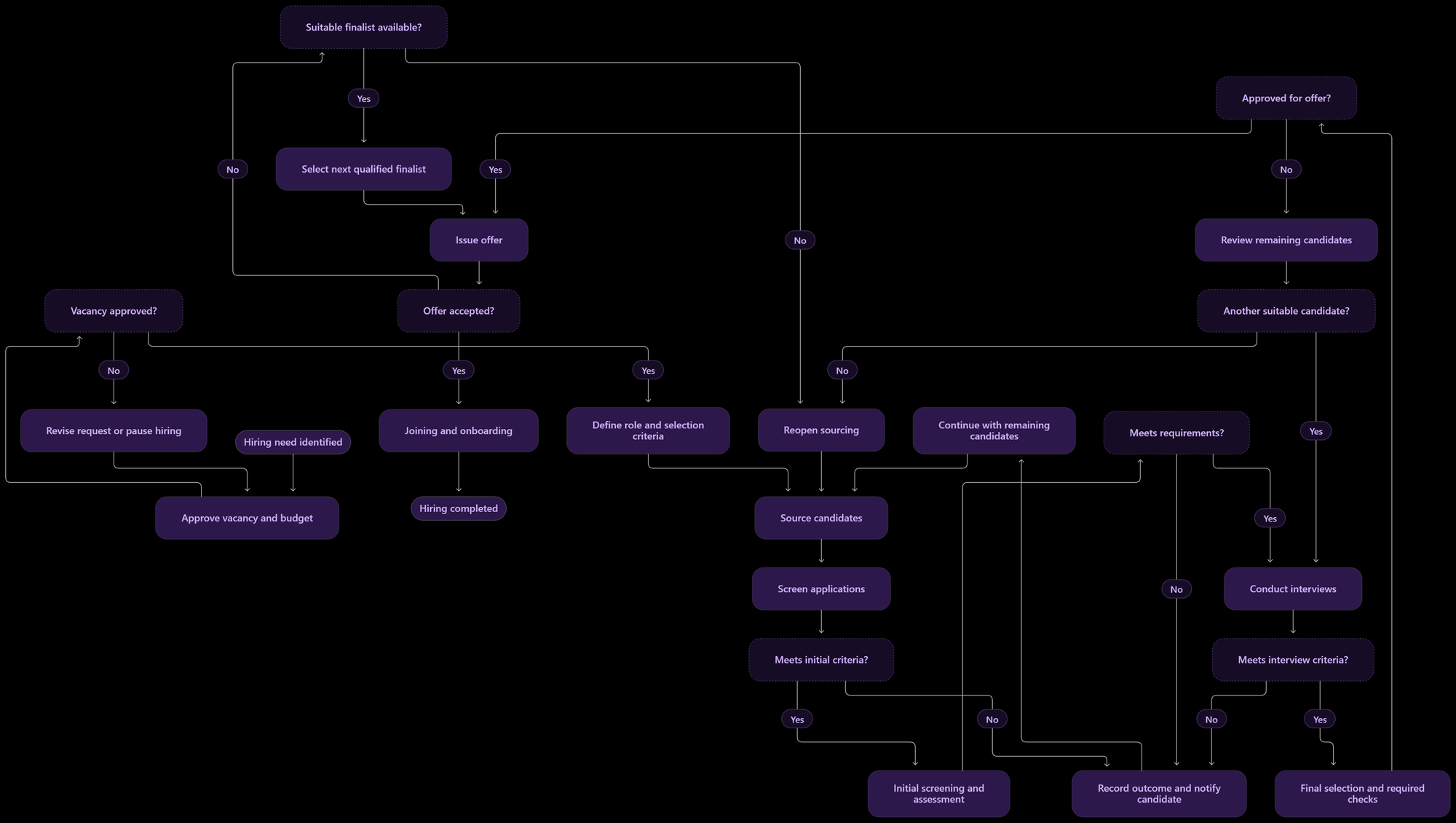
The diagram represents a general workflow rather than a mandatory sequence. For example, an organization may conduct reference checks before final approval or add a technical assessment between interview rounds.
The important principle is that every major decision should have a clear outcome and a defined next step.
The 5 Core Stages of Hiring
The detailed flowchart is useful for recruiters who need to understand individual tasks and decision points. For presentations, onboarding materials, or a quick overview, the entire hiring journey can also be summarized in five stages:
Source → Screen → Assess → Interview → Hire
| Stage | What happens |
| Source | Attract candidates through relevant channels. |
| Screen | Check eligibility and initial suitability. |
| Assess | Evaluate job-related skills and capabilities. |
| Interview | Explore experience, competencies, and role fit. |
| Hire | Issue the offer, complete joining activities, and onboard the employee. |
A simplified overview of the hiring lifecycle. Individual roles may require additional steps.
For a published graphic, use five connected boxes in a horizontal layout, with a short label and a simple icon for each stage. Keep the text readable on mobile devices and use the same terminology as the detailed flowchart.
Types of Recruitment and Hiring Process Flowcharts
Not every hiring workflow needs the same level of detail. Organizations can create different flowcharts for specific recruitment activities.
1. End-to-end recruitment flowchart
This shows the complete journey from hiring approval to onboarding. It is useful for documenting the standard process, explaining responsibilities, and identifying delays between stages.
2. Candidate screening flowchart
A screening flowchart focuses on application review, eligibility checks, initial conversations, and assessment decisions.
It can show what happens when a candidate meets the requirements, needs additional information, or does not qualify for the next stage.
3. Interview and assessment flowchart
This flowchart maps the interview rounds and assessments required for a role. It is especially useful when candidates must complete several evaluations before a final decision.
It should identify the responsible interviewer, evaluation criteria, feedback requirements, and decision points.
4. High-volume recruitment flowchart
High-volume hiring may involve hundreds or thousands of candidates applying for similar roles.
A dedicated flowchart can define how applications are grouped, how screening is prioritized, how candidates are contacted, and how assessment results are used to organize the shortlist.
The workflow should also account for unanswered calls, incomplete assessments, rescheduling, and candidate withdrawals.
5. Campus recruitment flowchart
Campus hiring often involves coordination between employers, placement teams, and large groups of students.
A campus recruitment flowchart may include institution selection, student registration, eligibility screening, assessments, interviews, offer communication, and joining confirmation.
6. Internal recruitment flowchart
Internal hiring requires a process for communicating opportunities to existing employees, reviewing internal applications, conducting evaluations, obtaining approvals, and coordinating transfers or promotions.
A separate workflow helps clarify internal eligibility rules and communication responsibilities.
How to Create a Recruitment and Hiring Process Flowchart
Creating a useful flowchart begins with understanding how hiring currently works. The goal is not to draw every possible activity immediately, but to establish a clear and practical sequence.
Step 1: Define the scope
Decide whether the diagram will cover the entire hiring journey or one specific activity.
For example, an end-to-end flowchart should include vacancy approval, sourcing, screening, evaluation, offers, and onboarding. A screening-only diagram can focus on application review and initial candidate decisions.
Step 2: Document the current workflow
Speak with recruiters, hiring managers, and other stakeholders to understand the actual steps.
Record the order of activities, who owns each step, what information is required, and what causes the process to move forward or backward.
Documenting the existing process can reveal informal approvals, duplicate tasks, and delays that may otherwise be overlooked.
Step 3: Identify decision points
Look for questions that change what happens next.
Examples include:
- Is the vacancy approved?
- Does the candidate meet the minimum criteria?
- Has the candidate completed the assessment?
- Does the interview feedback meet the defined standard?
- Has the candidate accepted the offer?
Each decision should have clearly labeled outcomes, such as Yes and No, with a defined destination for both routes.
Step 4: Assign responsibilities
Identify the person or team responsible for every major activity.
Depending on the workflow, ownership may belong to HR, recruiters, hiring managers, interviewers, finance, or the candidate.
Clear ownership helps prevent tasks from remaining pending because the next responsible person is unclear.
Step 5: Choose a flowchart format
You can create a flowchart using diagramming software, presentation tools, whiteboards, or a compatible diagram language such as Mermaid.
Choose a format that your team can easily view and update. If the diagram will be published online, confirm that the content management system supports the chosen format or use an exported image.
Step 6: Map the main path first
Start with the standard path from hiring approval to onboarding. Then add alternative routes for rejected candidates, missing information, unsuccessful assessments, declined offers, and vacancies that need to be reopened.
This approach keeps the initial diagram understandable while ensuring that important exceptions are not ignored.
Step 7: Validate the flowchart with stakeholders
Ask recruiters and hiring managers to walk through realistic scenarios using the diagram.
Check that every decision leads to a valid next step, that the process has a clear endpoint, and that the responsibilities match actual working practices.
Step 8: Review and update regularly
Hiring processes change as roles, policies, tools, and business needs evolve.
Assign an owner to the flowchart and review it whenever a significant process change occurs. Periodic reviews can also reveal unnecessary stages or repeated delays.
How Recruitment Technology Supports the Hiring Workflow
Recruitment technology can help teams manage repetitive tasks, organize candidate information, and maintain visibility across hiring stages. The most useful tools depend on the activity being improved.
Candidate sourcing and outreach
Sourcing tools help recruiters organize candidate information and manage outreach. For high-volume hiring, bulk candidate uploads and automated communication can reduce repetitive manual work.
For example, SkillBrew BrewVoice supports AI-powered voice screening calls, candidate outreach, multilingual conversations, and structured screening reports. It can support the initial screening portion of a hiring workflow when phone-based screening is appropriate.
Initial screening and candidate evaluation
Screening tools can help collect consistent information about candidates and organize results for recruiter review.
The workflow should define what information is collected, how results are reviewed, and what criteria determine whether a candidate progresses. Automation should support the process rather than replace appropriate human oversight.
Skills assessments
Assessment platforms help recruiters evaluate job-related capabilities before or during interviews.
SkillBrew AI Assessments supports role-specific assessment creation and candidate evaluation across different assessment formats. In a flowchart, this technology belongs at the assessment stage when the role requires an additional skills check.
Recruiters should define assessment criteria in advance and ensure that the selected assessment is relevant to the position.
Interview evaluation
Interview tools can support structured interviews, candidate evaluation, and report generation.
SkillBrew AI Interviews provides AI-led and other interview options, with interview reports and proctoring capabilities. It may support the interview stage when those evaluation methods fit the role and hiring policy.
The flowchart should still specify who reviews the results and who makes or approves the final hiring decision.
Hiring workflow visibility
Recruitment workflow and applicant tracking systems can help teams monitor candidate progress, coordinate handoffs, and track pending tasks.
Before adding a tool to the workflow, verify that it supports the required integration, reporting, and automation capabilities. Do not assume that every tool supports every stage or that all systems are connected automatically.
Common Mistakes to Avoid When Designing a Hiring Flowchart
A flowchart should simplify the hiring process, not create another layer of complexity.
1. Including too much detail
Listing every email, administrative action, and minor task in the main diagram can make it difficult to follow.
Keep the primary flowchart focused on major stages and decisions. Document detailed instructions separately when necessary.
2. Leaving decision outcomes undefined
A decision such as “Candidate suitable?” is incomplete if the diagram shows only the successful route.
Define what happens when the candidate does not qualify, withdraws, or requires additional evaluation. Every meaningful branch should lead to a valid next step.
3. Using inconsistent selection criteria
If recruiters use different criteria for the same role, the workflow may appear standardized without producing consistent evaluations.
Document the essential requirements and evaluation standards before candidates enter the process.
4. Ignoring candidate communication
A workflow that ends a candidate's progress without specifying how the outcome is communicated can lead to poor candidate experiences.
Include communication checkpoints and define responsibility for sending updates.
5. Automating an inefficient process
Automation can make a well-designed process more efficient, but it can also reproduce unnecessary steps or confusing decision rules.
Review the workflow before automating it. Remove avoidable duplication and confirm that every automated action has a clear purpose.
6. Failing to measure outcomes
A flowchart explains how the process should work, but it does not show whether it works well.
Monitor metrics such as time to hire, stage conversion rates, assessment completion, offer acceptance, and candidate withdrawals to identify areas for improvement.
7. Not updating the diagram
An outdated flowchart may direct recruiters to follow approval steps or responsibilities that no longer exist.
Assign an owner and update the diagram whenever the process changes.
How to Measure the Effectiveness of Your Hiring Flowchart
Once the flowchart is implemented, use recruitment metrics to evaluate whether the process is producing the intended results.
| Metric | What it helps measure |
| Time to hire | How long it takes to move from the agreed starting point to a completed hire. |
| Stage conversion rate | The proportion of candidates progressing from one stage to the next. |
| Assessment completion rate | The proportion of candidates who complete the required assessment. |
| Interview feedback turnaround | How quickly interviewers submit their evaluations. |
| Offer acceptance rate | The proportion of offers accepted by candidates. |
| Candidate withdrawal rate | The proportion of candidates who leave the process before completion. |
| Source-to-hire conversion | How effectively different sourcing channels produce hires. |
Establish consistent definitions for each metric. For example, organizations may define time to hire using different start and end points, so comparisons are meaningful only when the same definition is applied.
Use the results to identify bottlenecks rather than assuming that every delay indicates a problem. Some roles require more extensive evaluation than others, and reducing the number of stages is not always the best way to improve hiring quality.
Frequently Asked Questions
1. What is a recruitment and hiring process flowchart?
A recruitment and hiring process flowchart is a visual diagram that shows the sequence of activities and decisions involved in hiring an employee, from identifying a vacancy to onboarding the selected candidate.
2. What are the main stages of a hiring process?
The main stages generally include identifying the hiring need, approving the vacancy, defining the role, sourcing candidates, screening applications, assessing skills, conducting interviews, selecting a candidate, issuing an offer, and onboarding the new employee.
3. What symbols are used in a hiring flowchart?
Common symbols include ovals or rounded shapes for start and end points, rectangles for activities, diamonds for decisions, and arrows for the direction of the workflow. The exact appearance depends on the diagramming tool.
4. How does a hiring flowchart improve recruitment?
It clarifies responsibilities, standardizes important steps, makes decision points visible, improves candidate communication, and helps teams identify bottlenecks using recruitment metrics.
5. Can a hiring flowchart be used for high-volume recruitment?
Yes. A flowchart can help high-volume recruitment teams organize bulk sourcing, screening, assessments, candidate communication, interview scheduling, offer management, and onboarding. It should also account for incomplete applications, unanswered calls, withdrawals, and other common exceptions.
6. What is the difference between a recruitment process and a hiring process?
Recruitment generally focuses on attracting and evaluating candidates, while hiring often refers more specifically to selecting a candidate and completing the steps needed to bring them into the organization. In practice, the terms overlap, and many organizations use them to describe the complete employee selection journey.
7. Can recruitment technology automate every stage?
No. Recruitment technology can support selected activities, such as candidate outreach, screening, assessments, interview evaluation, and workflow tracking. The level of automation depends on the tools, integrations, job requirements, and organizational policies. Human review remains important for appropriate hiring decisions.
8. How often should a recruitment flowchart be updated?
Review the flowchart whenever a significant hiring policy, approval step, role requirement, or recruitment tool changes. Periodic reviews can also help identify unnecessary steps and recurring delays.
Conclusion
A clear recruitment and hiring process flowchart helps organizations turn a complex hiring journey into a sequence of understandable activities, responsibilities, and decisions. It gives recruiters and hiring managers a shared view of how candidates progress, where approvals are required, and what happens when a candidate does not move forward.
Start by mapping the current process, defining selection criteria, assigning ownership, and documenting alternative routes. Then validate the diagram with the people who use it and measure outcomes to identify opportunities for improvement.
Recruitment technology can further support the workflow by helping teams manage candidate outreach, assessments, interviews, and reporting. The objective is not to automate every decision, but to make the process more consistent, transparent, and manageable.
To explore how SkillBrew can support candidate screening and evaluation, visit BrewVoice, AI Assessments, and AI Interviews.
See AI-powered hiring in action
Discover how SkillBrew helps hiring teams cut time-to-hire by 60% with skill-validated assessments and AI-ranked shortlists.
Book a free demoNo commitment required · 30 minutes
Continue reading
View All Posts